
Currently, some device functions from previous models cannot yet be supported on the new models (see Section 2.1.1).
The mGuard protects IP data links by combining the following functions:
–Industrial security network router.
–Depending on the model with built-in 3- or 4-port switch and DMZ port.
–VPN router for secure data transmission via public networks (AES encryption, IPsec and OpenVPN protocol).
–Configurable firewall for protection against unauthorized access. The dynamic packet filter inspects data packets using the source and destination address and blocks undesired data traffic.
2.1New device platform FL MGUARD 2000/4000
The FL MGUARD 2000/4000 series devices are gradually replacing the established Guard devices of the RS2000/RS4000 and PCI(E)4000 series.
The new devices with proven mGuard Security Technology are equipped with fast Gigabit Ethernet and are operated with the mGuard 10.x firmware version.
The devices are compatible with their predecessor models, can import existing configuration profiles (atv files), and can be configured via CGI and GAI interfaces.
The mGuard device manager (starting with version mdm 1.17.0) can be used to manage mGuard devices with firmware versions up to 10.5.x installed (see user manual "UM EN MDM 1.17" – 111024_en_xx).
Currently, some device functions from previous models cannot yet be supported on the new models (see Section 2.1.1). |
2.1.1Functions that are no longer supported
Certain functions of the old device platform are no longer supported on the new device platform.
Hardware
The new mGuard models of the FL MGUARD 2000/4000 series are offered without serial interface and without internal modem.
Firmware (functions)
Device functions that are not supported on the new device platform are listed in Table 2-1.
When transferring older device configurations to these new devices, care must therefore be taken to ensure that the functions described in Table 2-1 have been deactivated or reset to the default settings in the device configuration before export (see also Section 2.1.6).
2.1.2Added functions that were already available on the old device platform
Variables that were already present on the old device platform but had been removed in the meantime were added again on the new device platform.
New function / variable / value |
New function / Impact of migration |
Firmware (Added with firmware version) |
|---|---|---|
[Deep Packet Inspection / Modbus TCP] Menu: Network Security >> Deep packet Inspection >> Modbus TCP Section: Rule Records Variable: various GAI
variable: MODBUS_RULESETS.x.SET.y.MODBUS_FUNCTION_CODE MODBUS_RULESETS.x.SET.y.ADDRESS_RANGE MODBUS_RULESETS.x.SET.y.TARGET MODBUS_RULESETS.x.SET.y.COMMENT MODBUS_RULESETS.x.SET.y.LOG MODBUS_RULESETS.x.LOG_DEFAULT
|
The mGuard device can check packets of incoming and outgoing Modbus TCP connections (Deep Packet Inspection) and filter them if necessary. Migration of older mGuard configurations No effect. Already configured variable values will be adopted. |
10.5.0 |
[Deep Packet Inspection / OPC Inspector] Menu: Network Security >> Deep packet Inspection >> OPC Inspector Section: OPC Inspector Variable: various GAI
variable: IP_CONNTRACK_OPC_SANITY IP_CONNTRACK_OPC_TIMEOUT
|
Until now, the OPC Classic network protocol could only be used across firewalls if large port ranges were opened. Activating the OPC Classic function allows this network protocol to be used easily without having to configure the mGuard device's firewall in an insecure way. Migration of older mGuard configurations No effect. Already configured variable values will be adopted. |
10.5.0 |
[Web access via HTTPS / Server certificate] Menu: Management >> Web Settings >> Access Section: HTTPS Web Access Variable: HTTPS server certificate GAI variable: HTTPS_SERVER_CERT_REF
|
Instead of the self-signed web server certificate pre-installed on the mGuard device, a separate machine certificate can be uploaded to the device and used. The device can use this certificate to authenticate itself to requesting clients. The use of CA certificates in conjunction with a certificate chain of trust is possible.
|
10.5.0 |
|
Migration of older mGuard configurations If an HTTPS server certificate is already in use, its use must be deactivated before migrating the configuration or updating the device. Command on the command line: gaiconfig --set HTTPS_SERVER_CERT_REF "" You can now perform the migration/update again and use the certificate again (if it is valid). If no HTTPS server certificate is used, the following applies: No effect. |
|
Variables have been added to the new device platform that are not available on the old device platform.
New function / variable / value |
New function / Impact of migration |
Firmware (Added with firmware version) |
|---|---|---|
[TCP-Dump] Menu: Support >> Advanced >> TCP Dump Section: TCP Dump Variable
(Action): (2) Stopping and downloading tcpdump |
A packet analysis (tcpdump) can be used to analyze the content of network packets that are sent or received via a selected network interface. Migration of older mGuard configurations No effect.
|
10.5.0 |
[Logging] Menu: Logging >> Settings Section: Data protection Variable: Maximum retention period for log entries (0 = unlimited) GAI variable: LOGGING_MAX_DAYS |
In order to comply with basic data protection requirements, it is possible to save log entries on the device only for a limited period of time. After a configurable storage period has expired, log entries will be deleted automatically from the device. Migration of older mGuard configurations No effect |
10.5.0 |
[Configuration profiles] Menu: Management >> Configuration Profiles Section: Configuration Profiles Signing Variables: Enable signed configuration profiles Export certificate (machine certificate used to sign configuration profiles) Import certificate (certificate used to validate signature of configuration profiles) GAI variables: PROFILE_SECURE_ONLY PROFILE_EXPORT_CERT PROFILE_IMPORT_CERT
|
Configuration profiles can be signed using certificates. On devices configured accordingly, it is then only possible to upload configuration profiles to the device that have been signed with valid certificates. Migration of older mGuard configurations No effect |
10.5.0 |
[OpenVPN Client] Menu: OpenVPN Client >> Connections >> Tunnel Settings Section: Data Encryption Variable: Encryption algorithm GAI variable: OPENVPN_CONNECTION.x.VPN_ENCRYPTION |
The "Blowfish" encryption algorithm is no longer supported. A total of six AES encryption algorithms can be selected instead of the previous three: AES-128-GCM / AES-192-GCM / AES-256-GCM / AES-128-CBC / AES-192-CBC / AES-256-CBC Migration of older mGuard configurations After migrating a configuration from an older firmware version with the "Blowfish" encryption algorithm configured, the value of the variable is set to "AES-256-GCM". The following applies to all other algorithms: The value from the migrated configuration is adopted unchanged. The configured encryption algorithm will not be changed. |
10.5.0 |
[HTTPS access] Menu: Management >> Web Settings >> Access Section: HTTPS Web Access Variable: Lowest supported TLS version GAI variable: TLS_MIN_VERSION |
Some functions of the mGuard device use TLS encryption, e.g.: –Web server (HTTPS access) –OpenVPN Client The used TLS version is negotiated between the remote peers. It is possible that a TLS version will be selected, that is no longer considered secure. To prevent this, it can be specified which TLS version will be accepted by the mGuard device as the lowest TLS version. Connections with lower TLS versions will be rejected by the mGuard device. Default: TLS 1.2 Migration of older mGuard configurations The variable will be configured with the value TLS 1.0/1.1. All TLS versions from TLS 1.0 are accepted by the mGuard device.
|
10.5.0 |
[Web access via HTTPS / Server certificate] Menu: Management >> Web Settings >> Access Section: HTTPS Web Access Variable: HTTPS server certificate GAI variable: HTTPS_SERVER_CERT_REF
|
Instead of the self-signed web server certificate pre-installed on the mGuard device, a separate machine certificate can be uploaded to the device and used. The device can use this certificate to authenticate itself to requesting clients. The use of CA certificates in conjunction with a certificate chain of trust is possible.
|
10.5.0 |
|
Migration of older mGuard configurations If an HTTPS server certificate is already in use, its use must be deactivated before migrating the configuration or updating the device. Command on the command line: gaiconfig --set HTTPS_SERVER_CERT_REF "" You can now perform the migration/update again and use the certificate again (if it is valid). If no HTTPS server certificate is used, the following applies: No effect. |
|
[LINK mode] Menu: Network >> Interfaces >> General Section: Network Status / Network Mode Variable: LINK mode GAI variable: ROUTER_MODE_LINK |
The mGuard device can use the device "CELLULINK" available from Phoenix Contact to establish a mobile data connection to other networks or the Internet (e.g. via the 4G network). If LINK mode is activated, a hyperlink to the web-based management of the device "CELLULINK" is displayed in the WBM area of the mGuard device. Migration of older mGuard configurations No effect.
|
10.5.0 |
[OpenVPN Client] Menu: OpenVPN Client >> Connections >> Tunnel Settings Section: Data Encryption Variable: Hash algorithm (HMAC authentication) GAI variable: OPENVPN_CONNECTION.x.VPN_AUTH_HMAC
|
The hash function used to calculate the checksum can be configured. Migration of older mGuard configurations After migrating a configuration from an older firmware version, the value of the newly added variable is set to "SHA-1". |
10.4.0 |
[Update Server] Menu: Management >> Update >> Update Section: Update Servers Variable: Server certificate GAI variable: PSM_REPOSITORIES.x.REMOTE_CERT_REF
|
To ensure that a secure HTTPS connection is established to the configured update server, a server certificate for the update server can be installed on the mGuard device. This can be used by the mGuard device to check the authenticity of the update server. Migration of older mGuard configurations After migrating a configuration from an older firmware version, the value of the newly added variable is set to "Ignore". |
10.3.0 |
[Alarm Output] Menu: Management >> Service I/O >> Alarm Output Section: Operation Supervision Variable: Passwords not configured GAI variable: PASSWORD_CHECK
|
A configurable alarm "Passwords not configured" for default passwords that have not been changed (admin/root) has been added to the device. The alarm triggers the alarm output via I/Os and the corresponding FAIL LED. Migration of older mGuard configurations After migrating a configuration from an older firmware version, the value of the newly added variable is set to "Supervise". |
10.3.0 |
In a few cases, the default settings of existing variables on the old and new device platform differ.
Function |
Changed default settings / Impact of migration |
Firmware (Added with firmware version) |
|---|---|---|
[OpenVPN Client] Menu: OpenVPN Client >> Connections >> Tunnel Settings Section: Data Encryption Variable: Encryption algorithm GAI variable: OPENVPN_CONNECTION.x.VPN_ENCRYPTION |
In the default settings, the encryption algorithm "AES-256-GCM" is used instead of "AES-256-CBC" as before. Migration of older mGuard configurations After migrating a configuration from an older firmware version with the "Blowfish" encryption algorithm configured, the value of the variable is set to "AES-256-GCM". The following applies to all other algorithms: The value from the migrated configuration is adopted unchanged. The configured encryption algorithm will not be changed.
|
10.5.0 |
[OpenVPN Client] Menu: OpenVPN Client >> Connections >> Tunnel Settings Section: Data Encryption Variable: Hash algorithm (HMAC authentication) GAI variable: OPENVPN_CONNECTION.x.VPN_AUTH_HMAC |
In the default settings, the hash algorithm "SHA-256" is used instead of "SHA-1" as before. Migration of older mGuard configurations The value from the migrated configuration is adopted unchanged. The configured hash algorithm will not be changed.
|
10.5.0 |
[E-Mail] Menu: Management >> System Settings >> E-Mail Section: E-Mail Variable: Encryption mode for the e-mail server GAI variable: EMAIL_RELAY_TLS |
In the default settings, the encryption algorithm "TLS Encryption" is used instead of "No encryption" as before. Migration of older mGuard configurations The value from the migrated configuration is adopted unchanged. The configured encryption mode will not be changed.
|
10.5.0 |
[Network Address Translation] Menu: Network >> NAT >> Masquerading Section: Network Address Translation/IP Masquerading Variable: Outgoing on interface / From IP
|
In default settings, a table row/rule with the following variable values is added: –Outgoing on interface: External –From IP: 0.0.0.0/0 IP masquerading is thus activated for all packets that are routed from the internal network (LAN) to the external network (WAN) (LAN --> WAN). Migration of older mGuard configurations The values from the migrated configuration are adopted unchanged. A new table row/rule will not be added. |
10.3.0 |
[Network Settings] Menu: Network >> Interfaces >> General Section: Network Mode Variable: Network mode
|
All devices of the new device generation are delivered in the network mode "Router". The external WAN interface receives its IP configuration via DHCP. In the default setting, however, the firewall prevents remote access to the device via the WAN interface. The device can be accessed from the LAN network via the internal LAN interface under the network address 192.168.1.1/24. Devices connected to the LAN interface can obtain their IP configuration via the DHCP server of the mGuard device. Migration of older mGuard configurations The values from the migrated configuration are adopted unchanged. The configured network mode will not be changed. |
10.3.0 |
In a few cases, variable values are no longer available on the new device platform and are replaced by other values.
Function |
Changed variable values / Impact of migration |
Firmware (Added with firmware version) |
|---|---|---|
[OpenVPN Client] Menu: OpenVPN Client >> Connections >> Tunnel Settings Section: Data Encryption Variable: Encryption algorithm GAI variable: OPENVPN_CONNECTION.x.VPN_ENCRYPTION |
The "Blowfish" encryption algorithm is no longer supported. A total of six AES encryption algorithms can be selected instead of the previous three: AES-128-GCM / AES-192-GCM / AES-256-GCM / AES-128-CBC / AES-192-CBC / AES-256-CBC Migration of older mGuard configurations After migrating a configuration from an older firmware version with the "Blowfish" encryption algorithm configured, the value of the variable is set to "AES-256-GCM". The following applies to all other algorithms: The value from the migrated configuration is adopted unchanged. The configured encryption algorithm will not be changed.
|
10.5.0 |
[Shell access] Menu: Management >> System Settings >> Shell Access Section: Maximum Number of Concurrent Sessions per Role Variable: Admin / Netadmin / Audit GAI
variables: SSH_NETADMIN_LOGIN_ALLOWED_MAX SSH_AUDIT_LOGIN_ALLOWED_MAX |
The "Maximum Number of Concurrent Sessions per Role" is limited to 10. Migration of older mGuard configurations –Applies to all configured values <= 10: –The value from the migrated configuration is adopted unchanged. The configured maximum number of concurrent sessions per role will not be changed. –The following applies to configured values > 10: –After the migration, the value of the variable "Maximum Number of Concurrent Sessions per Role" will be set to 10 in each case.
|
10.5.0 |
[Multicast] Menu: Network >> Ethernet >> Multicast Section: General Multicast Configuration Variable: IGMP snooping |
To ensure that data in "Static multicast groups" is forwarded correctly to the configured ports, "IGMP snooping" must be activated Migration of older mGuard configurations After a migration, the value of the variable will be changed as follows: –Enabled: If "Static Multicast Groups" are configured. –Enabled: If "IGMP snooping" is enabled in the old configuration. –Deactivated: If no "Static Multicast Groups" are configured and "IGMP snooping" is deactivated in the old configuration. |
10.3.0 |
2.1.6Migration of the device configuration
Migrating the configuration of older mGuard devices can be done via web-based management (WBM) or via SD card (ECS).
Requirements
If device functions of the device whose configuration is to be migrated are not available on the new device, the variables must be reset to the default settings before the configuration on the old device is exported (see Table 2-1).
The exact procedure for device migration is described in document 111259_en_xx (AH EN MGUARD MIGRATE 10), available at phoenixcontact.com/product/1357875.
The mentioned properties are not guaranteed properties, as they are basically dependent on the respective device.
Unless otherwise stated, when the FL MGUARD 4302 and FL MGUARD 4305 devices are mentioned in this document, the 4302/KX and 4305/KX variants are also included.
Network features
–Stealth (auto, static, multi), router (static, DHCP client)
–DMZ
–VLAN
–DHCP server/relay on the internal and external network interfaces
–DNS cache on the internal network interface
–Dynamic routing (OSPF)
–Administration via HTTPS and SSH
–LLDP
–MAU management
–SNMP
Firewall features
–Stateful packet inspection
–Anti-spoofing
–IP filter
–L2 filter (only in stealth mode)
–NAT with FTP, and IRC support (only in “Router” network mode)
–1:1 NAT (only in “Router” network mode)
–Port forwarding (not in “Stealth” network mode)
–Individual firewall rules for different users (user firewall)
–Individual rule records as action (target) of firewall rules (apart from user firewall or VPN firewall)
–Deep Packet Inspection for Modbus TCP
–Protective device for PROFIsafe network cells (in accordance with IEC 61784-3-3).
VPN features (IPsec)
–Protocol: IPsec (tunnel and transport mode, XAuth/Mode Config)
–IPsec encryption with DES (56 bits), 3DES (168 bits), and AES (128, 192, 256 bits)
–Packet authentication: MD5, SHA-1, SHA-265, SHA-384, SHA-512
–Internet Key Exchange (IKE) with main and quick mode
–Authentication via:
–Pre-shared key (PSK)
–X.509v3 certificates with public key infrastructure (PKI) with certification authority (CA), optional certificate revocation list (CRL), and the option of filtering by subject
or
–Remote certificate, e.g., self-signed certificates
–Detection of changing peer IP addresses via DynDNS
–NAT traversal (NAT-T)
–Dead Peer Detection (DPD): detection of IPsec connection aborts
–IPsec/L2TP server: connection of IPsec/L2TP clients
–IPsec firewall and IPsec NAT
–Default route via VPN tunnel
–Data forwarding between VPNs (hub and spoke)
–Up to 250 active VPN tunnels (depending on the device)
VPN features (OpenVPN)
–OpenVPN client
–OpenVPN encryption with AES (128, 192, 256 bits) (Block cipher modes: GCM and CBC)
–HMAC authentication: SHA-1, SHA-256, SHA-512
–Dead Peer Detection (DPD)
–Authentication via user identifier, password or X.509v3 certificate
–Detection of changing peer IP addresses via DynDNS
–OpenVPN firewall and 1:1 NAT
–Routes via VPN tunnels can be configured statically and learned dynamically
–Data forwarding between VPNs (hub and spoke)
–Up to 250 VPN tunnels
Additional features
–Remote Logging
–Administration using SNMP v1-v3 and mGuard device manager (FL MGUARD DM UNLIMITED)
–PKI support for HTTPS/SSH remote access
–Can act as an NTP and DNS server via the LAN interface
–Plug-n-Protect technology
–Compatible with mGuard Secure Cloud (mSC)
Support
In the event of problems with your mGuard, please contact your supplier.
For additional information on the device as well as release notes and software updates, visit: phoenixcontact.net/products/<item number>. |
2.3Typical application scenarios
This section describes various application scenarios for the mGuard.
–“Stealth mode (Plug-n-Protect)”
–“DMZ” (Demilitarized Zone)
–“WLAN via VPN” tunnel
–“Resolving network conflicts”
2.3.1Stealth mode (Plug-n-Protect)
In stealth mode, the mGuard can be positioned between an individual computer and the rest of the network.
The settings (e.g., for firewall and VPN) can be made using a web browser under the URL https://1.1.1.1/.
No configuration modifications are required on the computer itself.
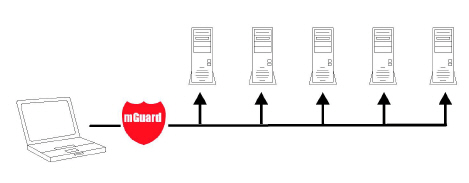
Figure 2-1 Stealth mode (Plug-n-Protect)
When used as a network router, the mGuard can provide the Internet connection for several computers and protect the company network with its firewall.
For computers in the Intranet, the mGuard must be specified as the default gateway.
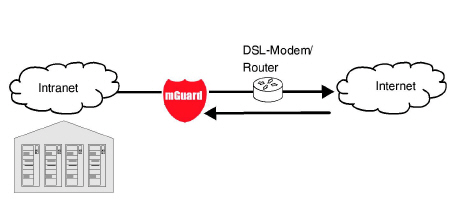
Figure 2-2 Network router
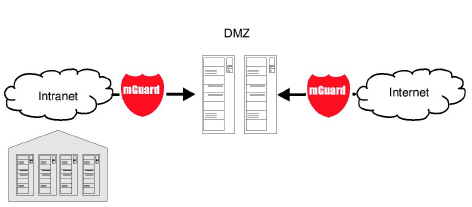
A DMZ (demilitarized zone) is a protected network that is located between two other networks. For example, a company's website may be in the DMZ so that new pages can only be copied to the server from the Intranet via FTP. However, the pages can be read from the Internet via HTTP.
IP addresses within the DMZ can be public or private, and the mGuard, which is connected to the Internet, forwards the connections to private addresses within the DMZ by means of port forwarding.
A DMZ scenario can be established either between two mGuards (see Figure 2-3) or via a dedicated DMZ port of some mGuard devices, e. g. the FL MGUARD 4305.
The DMZ port is only supported in router mode and requires at least one IP address and a corresponding subnet mask. The DMZ does not support any VLANs.
The VPN gateway provides company employees with encrypted access to the company network from home or when traveling. The mGuard performs the role of the VPN gateway.
IPsec-capable VPN client software must be installed on the external computers or failing that, the computer is equipped with an mGuard.
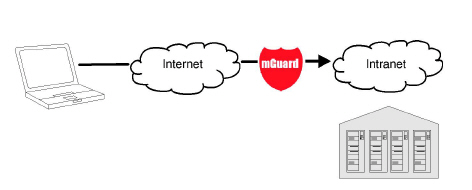
Figure 2-4 VPN gateway
WLAN via VPN is used to connect two company buildings via a WLAN path protected using IPsec. The adjacent building should also be able to use the Internet connection of the main building.
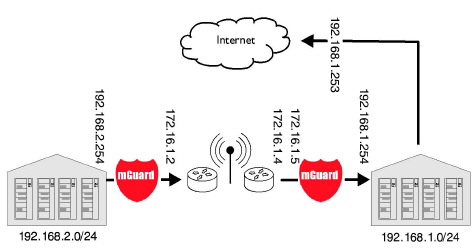
Figure 2-5 WLAN via VPN
In this example, the mGuards were set to router mode and a separate network with 172.16.1.x addresses was set up for the WLAN.
To provide the adjacent building with an Internet connection via the VPN, a default route is set up via the VPN:
Tunnel configuration in the adjacent building
Connection type |
Tunnel (network <-> network) |
Address of the local network |
192.168.2.0/24 |
Address of the remote network |
0.0.0.0/0 |
In the main building, the corresponding counterpart is configured:
Tunnel configuration in the main building
Connection type |
Tunnel (network <-> network) |
Local network |
0.0.0.0 |
Address of the remote network |
192.168.2.0/24 |
The default route of an mGuard usually uses the WAN port. However, in this case the Internet can be accessed via the LAN port:
Default gateway in the main building:
IP address of the default gateway |
192.168.1.253 |
2.3.6Resolving network conflicts
Resolving network conflicts
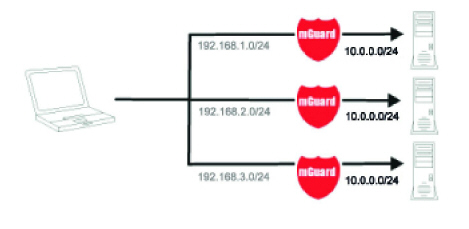
In the example, the networks on the right-hand side should be accessible to the network or computer on the left-hand side. However, for historical or technical reasons the networks on the right-hand side overlap.
The 1:1 NAT feature of the mGuard can be used to translate these networks to other networks, thereby resolving the conflict.
(1:1 NAT can be used in normal routing, in IPsec tunnels, and in OpenVPN connections.)


